


When a VoIP service becomes unavailable or starts behaving unpredictably, customers rarely know whether the problem is their handset, internet connection, router, account or the provider’s network. Their safest response is to contact support. If hundreds of customers experience the same event, the same uncertainty can create hundreds of calls, tickets and social messages within a short period.
Many of those contacts are not requests for technical intervention. They are requests for information: Is there an outage? Does the provider know about it? When will service return? Should the customer change anything? Proactive VoIP customer communication answers those questions before uncertainty becomes avoidable support demand.
This guide explains how VoIP providers, ISPs and managed connectivity teams can build a practical communication workflow for maintenance, outages, service degradation, billing events and restoration updates.

How VoIP customer communication reduces support pressure
A reactive process waits for customers to report a problem before explaining it. That approach may seem manageable during a small incident, but it becomes expensive at scale. Support agents repeat the same explanation, technical teams are interrupted for updates, and customers receive different answers depending on when and whom they contact.
The communication gap can also damage confidence. Customers may tolerate a service problem when they understand what is happening and see evidence of active management. Silence creates a different experience: customers must discover the issue themselves and then spend time proving it exists.
Typical signs of a reactive process
- The status message is written only after call volumes increase.
- Support agents rely on internal chat messages that quickly become outdated.
- Customers receive technical explanations without a clear statement of impact.
- No restoration message is sent, so customers keep testing or calling.
- Marketing and operational messages share no preference or suppression rules.
Proactive communication does not eliminate every support request. It reduces the repetitive contacts caused by missing, late or inconsistent information, leaving support teams more capacity for customers who need individual assistance.
What proactive customer communication looks like
A proactive workflow identifies the events customers need to understand, assigns an owner, defines the affected audience and prepares a sequence of messages. The goal is not to send more email. It is to send the right information to the right customers at useful moments.
Planned maintenance
Send an advance notice that states the maintenance window, expected impact, affected services or regions, and whether customers need to take action. A reminder closer to the window can reduce forgotten notices. After completion, confirm that work is finished and explain what customers should do if their service has not recovered.
Unexpected outages and degradation
An initial incident notice should acknowledge the problem even when the cause and restoration time are not yet known. State what is affected, when the incident began, what the technical team is doing and when the next update will arrive. A dependable next-update time is often more useful than an optimistic estimate that later changes.
Billing and account issues
Failed payments, expiring payment methods, usage thresholds and account restrictions can produce support demand when customers encounter consequences without context. Timely, clearly branded messages should explain the issue, the deadline and a secure next step without requesting sensitive information by email.
Product and service changes
Number migrations, configuration changes, pricing updates and retired features require more than a general announcement. Segment customers by product and impact, explain the reason in plain language, and give account-specific actions where appropriate.
A practical notification workflow for VoIP and ISP teams
- Define communication triggers. Agree which operational events require customer notification and which severity levels can remain internal.
- Identify the source of truth. Use the network operations or incident-management record as the authoritative source for scope, status and timing.
- Assign an owner. One role should approve customer-facing wording and decide when each update is sent.
- Select the affected audience. Segment by service, region, network component, account type or other reliable operational data.
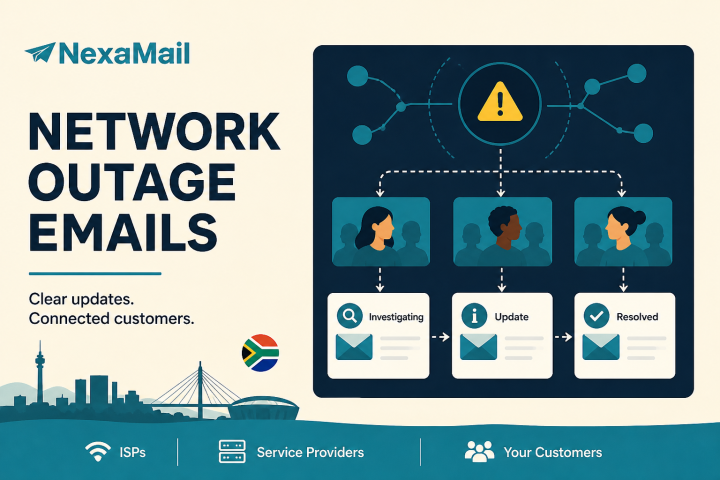
- Use a message sequence. Prepare acknowledgement, progress, restoration and follow-up messages rather than treating an incident as a single announcement.
- Coordinate support. Give agents the same approved message and timestamp so every channel presents a consistent explanation.
- Review the outcome. Compare delivery, engagement, support volume and customer feedback after the event.
Write messages customers can act on
Operational messages should be direct enough to scan on a phone. Start with the customer impact rather than an internal system name. Use timestamps with the South African time zone, distinguish confirmed facts from estimates, and place required actions prominently.
A useful outage update usually answers five questions:
- What is happening?
- Who or which services are affected?
- What is the provider doing?
- Does the customer need to do anything?
- When will the next update be provided?
Use segmentation to avoid notification fatigue
Sending every incident to every subscriber weakens trust and trains recipients to ignore future messages. Accurate segmentation is therefore an operational requirement, not merely a marketing technique.
Maintain reliable links between customer records and products, locations or service identifiers. Remove duplicate and invalid addresses, apply unsubscribe and suppression rules correctly, and distinguish essential service communication from optional promotional content. Where a message is legally or contractually necessary, obtain appropriate advice about the lawful basis and channel rather than assuming that all contacts can receive every email.
Deliverability matters during incidents
A notification only reduces support demand if it reaches the inbox promptly. Providers should authenticate sending domains with SPF and DKIM, implement DMARC deliberately, monitor bounces and complaints, and avoid sudden sending patterns from an unprepared domain.
Operational and promotional streams may need separate subdomains or sending configurations so that one programme does not unnecessarily affect the reputation of another. Keep templates lightweight, use recognisable sender identities, and test links and rendering before an urgent event occurs. For high-volume sends, segmenting and controlled dispatch can protect infrastructure while still meeting the communication objective.
POPIA and privacy considerations
Customer communication involves personal information and should follow the organisation’s POPIA responsibilities. Collect only the data needed for the stated purpose, limit access, keep records accurate, and define appropriate retention periods. Clearly explain why customers receive each type of communication and provide preference or unsubscribe controls for messages where those controls apply.
Avoid placing account credentials, call records, payment details or other sensitive information in ordinary email. Direct customers to an authenticated portal for private actions. Providers should document their lawful basis and review guidance from the Information Regulator South Africa and obtain professional legal guidance for their specific circumstances; a communication platform does not replace the organisation’s compliance obligations.
Measure whether communication reduces friction
Open and click rates are useful, but they do not tell the whole operational story. Review support contacts per affected customer, duplicate tickets, time to first customer notice, delivery and bounce rates, and the percentage of recipients reached before they contacted support.
After a major incident, ask support and technical teams which questions customers still asked. Those questions reveal missing information or poor timing. Improve the templates, audience rules and approval workflow before the next incident.
Where NexaMail can fit
NexaMail provides South African service organisations with tools for reliable, branded, high-volume customer email communication. Teams can manage contacts and segments, send service updates and newsletters, automate recurring communication, and review delivery and engagement from one platform.
The practical starting point is not to migrate every message at once. Choose one repeatable use case, such as planned maintenance notifications, define the audience and approval workflow, and test the full sequence. Once the process is dependable, extend it to outage updates, onboarding, billing reminders or customer education.
Build the process before the next incident
Proactive communication works best when it is designed before service pressure rises. Document triggers, owners, audiences and templates; verify sending infrastructure; and rehearse the approval path. Customers will still contact support when they need individual help, but they should not have to open a ticket simply to learn that a known incident exists.
If your organisation sends customer updates at scale, discuss your communication workflow with the NexaMail team or explore transparent local sending plans.
Community discussion
Be the first to comment
Add a useful question or perspective. Comments are reviewed before publication.