

Practical triggers
Start a journey when a contact subscribes, reaches a date, gains a tag, changes an attribute or arrives through an API call.
Email automation for service businesses
Build onboarding, reminder, renewal and follow-up journeys using customer dates, tags, engagement and events from the systems your team already uses.
Trigger journeys from meaningful events
Use delays and conditions to control timing
Connect activity through APIs and webhooks
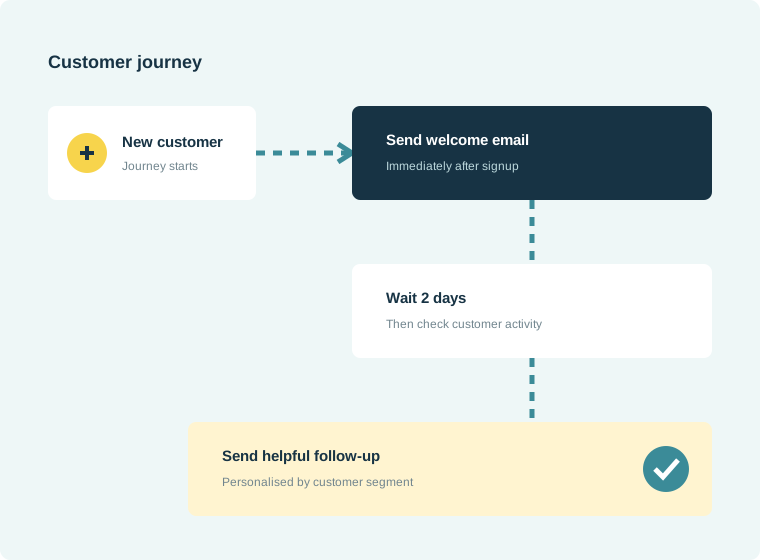
How it works
Start with the customer event, then add only the timing and decisions the workflow needs. NexaMail supports subscriber, date, birthday, recurring-schedule, tag, attribute-change, engagement, API and unsubscribe triggers, with email, delay, condition, webhook and contact-operation steps.
Built for everyday communication
Move repeat communication out of inboxes and spreadsheets while keeping every journey understandable and measurable.
Start a journey when a contact subscribes, reaches a date, gains a tag, changes an attribute or arrives through an API call.
Combine email steps, delays and conditions for onboarding, reminders and engagement-based follow-up.
Update contacts or call a webhook so customer activity can continue into another business system.
Built for practical use
Flexible enough for marketing, focused enough for the customer communication your organisation depends on.
Practical guidance
Turn the feature into a reliable customer communication practice with guidance specific to this workflow.
Document the manual journey before building it. If responsibilities, timing or customer outcomes are unclear offline, automation will reproduce the same confusion at greater scale.
Customers should know how to reach a person when an automated message does not resolve their situation, especially for service changes, failed payments and time-sensitive appointments.
Check triggers, links, owners and message accuracy after operational changes. A short quarterly review prevents outdated instructions from reaching customers automatically.
Common questions
A journey can start from a new subscriber, date or birthday, recurring schedule, tag, attribute change, engagement event, API call or unsubscribe event, depending on the workflow.
Yes. Teams can build understandable sequences with email, delay and condition steps, while technical integrations can be added only where the process needs them.
NexaMail can receive customer events through an API and pass activity to another system through webhooks. It acts as the communication layer rather than replacing your CRM, booking, billing or help-desk system.
Ready when you are
Before you begin
Strong results start with a clear communication process—not simply more software.
Start with a meaningful event such as signup, appointment booking, renewal date or completed service.
Use only the messages and delays needed to help the customer complete the next useful step.
Stop or change the sequence when a customer responds, converts or no longer needs the reminder.
Measure what matters
Use these indicators to improve the communication process, not merely to produce another report.
Shows how many customers reached the intended final step.
Reveals where delays help or cause customers to lose momentum.
Track repetitive messages your team no longer needs to send individually.