

Welcome journeys
Guide new customers with timely onboarding messages.
Smart automation
Build practical automated journeys for onboarding, reminders and follow-ups while your team focuses on service.
Respond at the right moment
Reduce repetitive manual sending
Keep every journey consistent
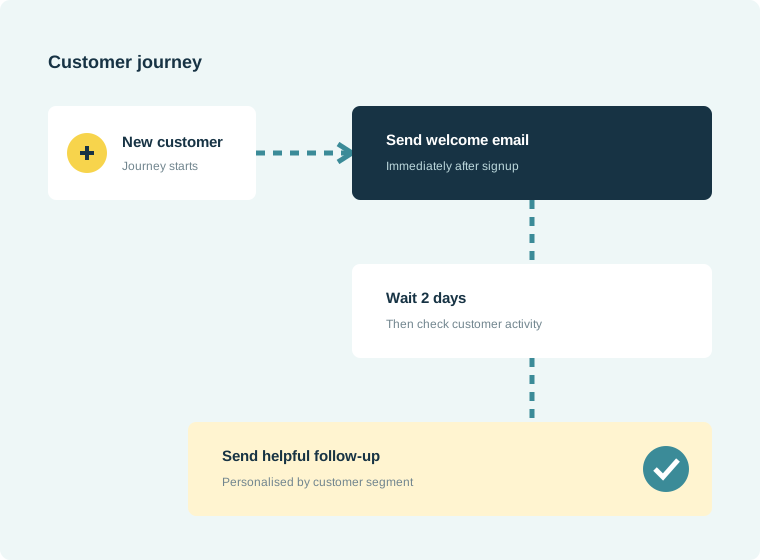
How it works
Automation should remove repetitive work without making communication feel robotic. NexaMail lets teams trigger practical sequences for onboarding, appointments, renewals and follow-ups, with clear timing and audience rules.
Built for everyday communication
Start simply, then extend your workflows as communication needs grow.
Guide new customers with timely onboarding messages.
Schedule appointments, renewals and service reminders.
Continue conversations automatically after key actions.
Built for practical use
Flexible enough for marketing, focused enough for the customer communication your organisation depends on.
Practical guidance
Turn the feature into a reliable customer communication practice with guidance specific to this workflow.
Document the manual journey before building it. If responsibilities, timing or customer outcomes are unclear offline, automation will reproduce the same confusion at greater scale.
Customers should know how to reach a person when an automated message does not resolve their situation, especially for service changes, failed payments and time-sensitive appointments.
Check triggers, links, owners and message accuracy after operational changes. A short quarterly review prevents outdated instructions from reaching customers automatically.
Common questions
Automations can begin from customer actions, list changes, form submissions or connected business systems, depending on your setup.
Yes. Journeys are designed to be understandable and manageable without needing developers for everyday changes.
NexaMail supports APIs, SMTP, webhooks and integrations for connecting customer events from websites, CRMs and internal platforms.
Ready when you are
Before you begin
Strong results start with a clear communication process—not simply more software.
Start with a meaningful event such as signup, appointment booking, renewal date or completed service.
Use only the messages and delays needed to help the customer complete the next useful step.
Stop or change the sequence when a customer responds, converts or no longer needs the reminder.
Measure what matters
Use these indicators to improve the communication process, not merely to produce another report.
Shows how many customers reached the intended final step.
Reveals where delays help or cause customers to lose momentum.
Track repetitive messages your team no longer needs to send individually.